The women of Google have come up with a clever, tongue-in-cheek way to raise awareness about gender equality after an investor made a sexist remark at the company's annual shareholders meeting last week.





- image from www.scrawnytobrawny.com
I don’t normally do this, but this is a great article…
“During the course of conversation, I made a couple negative comments about my life; essentially, I started complaining about my situation.
Phil looked me in the eye and asked, point blank, “Are you actually complaining right now?”
It caught me off guard to be questioned like that, because I was used to commiserating with other entrepreneurs about how “hard” our lives were and all the things we wished we could change.
…I was being a colossal tool.”
I’ve heard that some people refer to the excessive mail that comes in from legitimate sources (e.g., your airline plan, Groupon and hotel plans) as “Bacon.” In other words, it’s not SPAM, it’s bacon. I don’t think that’s a good term because why would you associate something negative with bacon?
Anyway, the issue that I have been complaining about for a long time is not the volume of email from accounts that are genuine, but SPAM that comes as a result of human error. Someone mistyped in the address somewhere along the way and now you get their mail. I’ve decided to call this type of email “SPAM Green.” Why? Because it’s people! SPAM Green is people!

If that doesn’t make any sense to you, you really need to watch Soylent Green.
I have a relatively short email address (6 characters), so this happens to me all the time—I mean every week I get mail that’s for someone else. Much of the time, there’s an unsubscribe option, so I just do that, but sometimes there is no way to unsubscribe so I have to just mark it as junk. The funniest ones are the messages that include login details for their account. Of course, I don’t use that information for evil, but one time I got messages from some shady “have an affair” site, so I did use the info to go in and delete the account.
“Halo 3 sold more than US$170 million worth of copies in the first twenty-four hours of release, breaking the record set by Halo 2 three years prior.[5][6] The games have sold over 34 million copies worldwide, and all Halo merchandise has grossed more than $1.7 billion.”
- Wikipedia
“Microsoft Corp said its "Halo 4" video game racked up $220 million in global sales on its launch day, beating records set by previous installments of the hit series.” – Yahoo News
Since the announcement of Halo 4 at the E3 conference, I’ve been reminiscing about the Halo franchise. I have fond memories—after all, I spent enough time with Halo to write three books: The Black Art of Halo Mods (Sams), Halo 2 Hacks (O'Reilly) and The Unauthorized Halo 2 Battle Guide (Thompson).
The Halo video game series has clearly been a fantastic success for Bungie, Microsoft and the Xbox group. As I played through Halo: Reach, I thought I’d write up a post about the most memorable differences between the various flavours of Halo. I wanted to do this as much from memory as possible so that the things that were really memorable get the most attention.
I didn’t get around to posting what I wrote, so now that I’ve had some time with Halo 4, it seems like it’s about time to post.

The first version of Halo (Halo 1, or Halo: Combat Evolved) is a first-person shooter (FPS) that was released on the original Xbox platform. It became the most important game in the success of the new Xbox video game console and spawned a massive franchise.
These are the aspects of the original Halo that I remember most vividly:

- © 2001 Microsoft
A couple of years after the Xbox version of Halo, a PC edition was released. This became known as Halo PC. It was a popular game since consoles were still not considered cool by hard-core gamers. Basically, if you couldn’t use a keyboard, a lot of FPS fans, wouldn’t take the game seriously.
Thanks to networking options there was a vibrant multi-player scene for Halo PC and it boasted far more maps than the original Xbox game. If I remember correctly, the flamethrower—which was cut from the original Xbox game—was available in Halo PC.

Halo 2 was a significant advance. Included in the upgrade was:
Here are some of the Halo 2 Cons:
I wrote my first Halo book about Halo 2 multiplayer: The Unauthorized Halo 2 Battle Guide: Advanced Combat Techniques. Despite some unfounded allegations to the contrary, I did not violate any NDA agreement by writing this book and I did not release any information that wasn’t already in the public domain.
And since I did have a legal right to write about Halo, I decided to exercise it by writing Halo 2 Hacks. Which is a book about Halo 2 Easter eggs, glitches, skulls, tricks and mods. I tried hard to spread the word about modding as a creative and positive hobby, but I have to admit that most press at the time focused on modding as a form of cheating and it was hard to have my voice heard above the people claiming that all modding is bad—a perspective that is indefensible when people take the time to understand the modding community.
Halo 2 Hacks: Tips & Tools for Finishing the Fight. After the experience with my first book, I had to take precautions. Before writing Halo 2 Hacks, I paid an overpriced lawyer to write a decision in support of my legal right to write books about Halo. That document clearly asserted that the 1980 “Pac-Man decision” set the precedent for instructional books about software. After that, no one bothered to question whether there were any legal issues with writing books about Halo.
In 2004, Microsoft made the enlightened decision to release some of the developer tools that were used to create Halo. This version was called HaloCE (for ‘custom edition’—not to be confused with ‘combat evolved’) and was an add-on for the PC version HaloCE brought modding support to the Halo universe. Unfortunately, it was the last time a version of Halo included support for ad-hoc modding. A map editor was added later on, but it doesn’t compare to the power and potential that Halo modders experienced with HaloCE.
If you had a Halo PC disk, you could install Halo Custom Edition (HaloCE). Some people confused HaloCE with Halo: Combat Evolved, but they’re entirely different beasts. I wrote the Black Art of Halo Mods about modding HaloCE. This book combined many tutorials from the Halo modding community.

- © 2007 Bungie/Microsoft
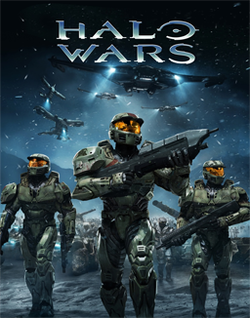
Halo 3 was another step up for Bungie. The graphics and game play were better, but it really felt like they spent much more time on the multiplayer experience than the campaign.
- © 2009 Bungie/Microsoft

- © 2009 Bungie/Microsoft
I understand that ODST was meant to be a different kind of Halo game—I get it. However, that doesn’t mean I have to like it. What I remember from ODST is long sections of walking around in a dark city and not doing much. There were flashback scenes to daylight that had the best battles in the game; some really fun fights.

- © 2010 Bungie/Microsoft

- © 2012 Microsoft
Halo 4 is the first new Halo game developed by 343 Industries. They worked on the Halo 1 Anniversary Edition, but that was just a graphics upgrade—not a whole new game. I’ve only just begun Halo 4, but so far I like it.
Halo has obviously had a grand impact on the gaming community. I don’t know the numbers, but it must be the best selling game for the Xbox. Halo 4 is the beginning of a new trilogy and I’m sure that 343 will do an excellent job with the next two installments.
Quite regularly, I read this question in a forum, hear it asked at a conference, or someone asks me personally, “How does someone become an MVP?” There is no simple answer, but here’s my stab at it.

First of all, if there is only one thing to remember about the MVP award, it’s this: the Microsoft Most Valuable Professional (MVP) award isn’t a certification.
There are no set criteria or steps that someone can take to become an MVP. As the name implies, it’s an award. However, there are certainly things that you can do to work towards getting a nomination. As I mention below, most people would tell you not to aim for MVP status. It requires significant time and effort, so if you’re not having fun doing community-focused work, it’s probably not worth it.
I think a quick explanation is in order. The MVP award is given out based on specialties. Mine is Microsoft SharePoint Server, so that’s what I’ll be referring to throughout this post, but categories do not have to be products. There are MVPs for development languages (e.g., C#) and there are MVPs for platforms (e.g., ASP.NET or XNA). There are currently about 240 SharePoint MVPs around the world.
“This award is given to exceptional technical community leaders who actively share their high quality, real world expertise with others. We appreciate your outstanding contributions in SharePoint Services technical communities during the past year.”
- Microsoft
In practical terms, this means helping with community-focused resources such as contributing to the SharePoint newsgroups, speaking at conferences, writing about SharePoint and contributing code to CodePlex (an open source site used by the SharePoint community).
The benefits of being an MVP include a TechNet subscription, a subscription to the Microsoft Developer Network (MSDN), access to MVP/product group forums/distribution lists/Yammer networks, software benefits such as access to Office 365 and TechSmith Camtasia Studio, early access to new product builds, and an invitation to the annual MVP Summit. However, the main benefit is being part of the MVP community. I greatly enjoy spending time with other MVPs. If you have a technical question, they’re the best people to ask, and we share common experiences so I often either commiserate or celebrate with them.
The award is given based on nominations--a panel ultimately decides who receives it. There are no published criteria and the members of the panel aren’t disclosed. Also, one key factor is that Microsoft likes to have representation around the world. If there are already a bunch of MVPs in your area—and for your specialty/product—that could make it harder to get the award. However, there is a surprising number of SharePoint MVPs in Toronto, Canada, so this is isn’t a hard rule.

These are the main things that historically have helped with MVP status:
· Speaking at events, conferences and user groups
· Writing original content (e.g., blog posts, articles and books). You must have a blog.
· Developing community apps (usually posted to CodePlex)
· Taking Microsoft certification courses
· Contributing/organizing/starting user groups
· Contributing to the MSDN forums (mainly answering questions).
· Participate in social media and social events (e.g., Twitter, Yammer and social events such as SharePint). You need to get your name out there as a subject matter expert (SME), so the people on the panel have heard your name and seen your work.
I tell people that trying to get the award should not be their focus; there should be value to the things they’re doing independent of trying to become an MVP. However, if I were to set out to get the award today, this is what I would do:
1. Pick a well-defined audience (end-user, dev or admin) and a well-defined sub-topic within SharePoint (or your area of expertise) to focus your efforts. SharePoint is simply too big a topic to do everything.
2. Talk to MVPs and MVP leads (especially your local lead) to get their insight into what would help you get nominated.
3. Meet in person with the current MVP lead for your region. This can help you figure out what’s most important to Microsoft now.
4. Submit presentation proposals to the biggest conferences you can afford to attend, the Microsoft SharePoint Conference plus some user groups and smaller private shows. For the bigger shows, it’s best to submit more than one session since they get way more proposals than they can accept.
5. Make sure you’re regularly posting original content about your expertise. Blog posts, articles, etc.
6. Take some certification courses. Becoming a Certified Master or Certified Architect is a good (but expensive) way to get ‘street cred.’
7. Answer some questions in the MSDN forums, but keep in mind there’s a new certification (Microsoft Community Contributor Award) that’s meant specially for people who do this a lot. I have a notification that goes off every weekday to remind me to go to the SharePoint forums and answer questions.
8. Regularly participate in social media to ensure that the current MVPs in my area and the Microsoft reps know who I am.
Note that somebody has to nominate you. It’s unlikely that you’ll just get an email one day saying you’ve won an MVP award. You need to be talking to people in the community and from Microsoft so that you have a relationship with them and you have some visibility for the good work you’re doing, Note that I’m not suggesting that it’s just a popularity contest; networking and visibility are only helpful if you’re contributing something that has value.
It’s not easy to win the MVP award, so once again, it’s not a good idea to aim to get one—do the things you love to do and if you win the award, it’s a bonus. I feel fortunate to have received three MVP awards and I certainly make good use of the benefits. But I don’t expect that it will be just handed to me… when it comes to renewal… Microsoft will only consider what you’ve done in the last 12 months, so winning the award once doesn’t mean you’ve reached the end of the journey.
Hope that helps keep it clear as mud.
I would not have expected the debate about SharePoint as an application vs. a platform to begin again, but that seems to be the case. A number of SharePoint consultants and other SharePoint experts are expressing concern about a few features that have been changed or removed from SharePoint with the SharePoint 2013 Preview release. The most obvious being the SharePoint Designer Design View--which has prompted a hot discussion on the MSDN SharePoint forums. These individual items may be annoying some people, but there’s more going on here. This isn’t just a few items being removed, it’s part of a fundamental shift in the SharePoint messaging. SharePoint has been promoted heavily as a customizable platform, but that message is changing. I posted this reply in the forums:
I believe this is part of a larger discussion. If you read the messaging coming from the SharePoint team, this change is consistent with a move away from SharePoint being such an open and customizable platform. That's not my opinion; here's the supporting quote:
"Use SharePoint as an out-of-box application whenever possible - We
designed the new SharePoint UI to be clean, simple and fast and work great
out-of-box. We encourage you not to modify it which could add complexity,
performance and upgradeability and to focus your energy on working with users
and groups to understand how to use SharePoint to improve productivity and
collaboration and identifying and promoting best practices in your organization." - Jeff Teper, VP SharePoint - The New SharePoint (SharePoint team blog post)
This forum response, from a user named Intrawebs, gives you an idea of the reaction: “I am a developer, but, when it comes to SP I try and do as much as possible in SP Designer vs. Visual Studio. It federates responsibility and enables non devs to contribute more easily. This will be a deal breaker for us, we use SP on our public and intranet sites. Poor decision from MS…”
When SharePoint first came out, it's primary value was as an application--a quick way to create an Intranet. MCMS at the same time was designed as a platform--build your own site, but build any type of site. The market responded that they wanted both in one product and SharePoint made huge strides as a platform. Now it seems that the SharePoint team has decided that the pendulum has swung too far.
Is this a good change for SharePoint customers? Is it a good change for SharePoint customers? These are hard questions to answer. What is clear is that less SharePoint customization is probably not good for SharePoint consultants. There seems no way around the simple formula that less customization = less work.
Some ISVs could benefit from this change. For example, migration vendors have to work extremely hard to support customizations, so there may be less work in that area. However, one of the reasons customers use third-party migration products (such as my former company, Metalogix) is to deal with customizations, so that’s not clear. Also, this is a preview release.
While the new SharePoint App model does add a new dimension to SharePoint development, I’m sure that most SharePoint devs would say that they expected this to be an additional choice rather than the only choice.
Put a number in the title.
How often do you see “Top 10 Ways To…” or “5 Important Rules for…” It’s an effective technique but I’m tired of it.
(See How To Write Attention Grabbing Blog Post Titles – With Examples for actual advice on writing catchy blog posts.)

Wikipedia and O’Reilly Media are just two of the websites that went dark today in protest of the proposed Stop Online Piracy Act (SOPA) legislation in the United States. The US already has anti-piracy legislation and this new bill goes too far. As an author, I understand how terrible it feels to have your work stolen. My first Halo book was actually hand scanned then posted online and many of my other books have also been pirated in one way or another. I also have an interesting perspective on this issue because I was also wrongly accused of violating a legal agreement by writing one of my books—something I put to rest when I hired a lawyer and then went on to write two more books on the subject (one for O’Reilly Media BTW). The publisher in that case handled the issue extremely poorly and it’s precisely the sort of thing that would enable SOPA to shut down an innocent website. Copyright infringement is awful, but this bill simply isn’t the right way to deal with the issue.
What’s in this bill? Here’s some text from the summary: “This bill would establish a system for taking down websites that the Justice Department determines to be dedicated to copyright infringment [sic]. The DoJ or the copyright owner would be able to commence a legal action against any site they deem to have "only limited purpose or use other than infringement," and the DoJ would be allowed to demand that search engines, social networking sites and domain name services block access to the targeted site.”
From the Washington Post: “Why are tech start-ups so vehemently opposed? These companies have argued that the bills are tantamount to Internet censorship. Rather than receiving a notification for copyright violations, sites now face immediate action — up to and including being taken down before they have a chance to respond”
If you would like a quick visual explanation of this issue, visit americancensorship.org.

From today’s O’Reilly message…
…
These legislative attacks are not motivated by clear thinking about the future of the Internet or the global economy, but instead seek to protect entrenched companies with outdated business models. Rather than adapting and competing with new and better services, these organizations are asking Congress for cover.
Any forward-looking country must encourage its emerging industries, not protect its laggards. Yet, in a time when the American economy needs to catalyze domestic innovation to succeed in a hyper-competitive global marketplace, members of the United States Congress have advanced legislation that could damage the industries of the future.
…
Here’s what you can do:
1) Learn if your U.S. Representative or Senators support SOPA or PROTECT IP through SOPAOpera.org.
2) Use the tools at AmericanCensorship.org, StopTheWall.us and POPVOX to tell Congress where you stand.
3) Participate in Better Activism Day, a free livestream of experts discussing ways to "improve your power in Washington from people who’ve been successful at moving it."
4) Call or meet with your representatives in Congress. The single most effective action any concerned citizen who wants to talk to Congress can take is to see your Senator or Representative in person. Failing that, call them. Write them a letter. Make sure your voice is heard.
There are many, many, SharePoint conferences around the world. But the biggest one remains the Microsoft SharePoint Conference (SPC). It happens about every 18 months or so and it’s the official event for all things SharePoint. This year’s conference is October 3-6 in Anaheim, CA and many of the attendees are thrilled that Microsoft has rented Disneyland for the attendee party.

One interesting statistic about this year’s conference (#SPC11) is that registration is rumoured to be lower than the last show. The last SharePoint conference, SPC 2009, boasted an impressive 7,400 attendees at a time when the economy was still reeling from the crash. At that show, there was a buzz (and I was contributing to it) about how SharePoint was so healthy that there was no sign of the recession in the SharePoint space. By comparison, the 2007 conference had 3,800 attendees.
[Update: I’m told that registration has been solid right down to the wire and we should all stay tuned to see what the real number is when the show starts on Monday.]
[Update to the update: It has just been announced (the Friday before the show) that the conference has sold out. The actual attendee number hasn’t been announced yet.]
So, the rumoured lower attendance this year begs the question, “Is this a sign of a slow down in the SharePoint community?” and by extension, a problem that Microsoft needs to worry about? My position is that there is no issue and my rationale is threefold: the SharePoint business is healthy, this is the worst time in the SharePoint release cycle for a conference, and the SharePoint community is healthy.
SharePoint was the fastest Microsoft product in history to reach $1 Billion in revenue. That’s quite an accomplishment and it might be tempting for the SharePoint group to rest on their laurels. Well, that’s not the way Microsoft works. Product group employees typically change jobs every two years or so. That’s not to say that the whole team that shipped Microsoft Office SharePoint Server 2007 (MOSS) has moved on to other projects, but most of them are likely in different roles and that means this is their first release with their current responsibilities. That’s one of the techniques at Microsoft for keeping employees engaged.
In a recent survey conducted by Metalogix Software and ESG, “which surveyed 3,129 IT professionals, 64 percent of North American and Western European organizations are currently using SharePoint, while an additional 12 percent intend to within the next 24 months. This overwhelmingly confirms that SharePoint is now considered to be a top business application – 80 percent ranked it among their top 10 business applications- a significant update since the March 2009 survey.”
Of course, there’s another key factor in the outlook for SharePoint. In short, Office 365 changes the landscape of SharePoint market potential. Office 365 is Microsoft’s cloud offering that includes SharePoint 2010. For many companies out there, the attraction to the economics of the cloud will have them taking a long hard look at the silver lining of the Office 365 cloud (yes, that’s a mangled metaphor I know, sorry). Also, as I recently discussed in a couple of Metalogix hybrid cloud webinars, there are many scenarios that organizations are looking at which involve both SharePoint Online (e.g., Office 365) and SharePoint on-premises.

We’re basically in the middle of the SharePoint release cycle. It’s a terrible time for a conference since the Beta of the next version is not out yet and the current release has been out for some time. This makes the conference a tougher sell for many people who have to justify the time and expense to their managers.

If you have any doubts at all about the SharePoint community, just call up Dux Raymond Sy (@meetdux)—or any of the organizers for that matter—and ask how SharePoint Saturday the Conference went in DC this year. It was roughly twice the size of the same event last year and, at the time, that was the largest SharePoint Saturday event ever.
The SharePoint community is stronger than ever and it’s showing no signs of slowing. There are dozens of SharePoint experts around the world taking time out of their lives to travel to SharePoint conferences and deliver educational sessions. In fact, organizers of these events are receiving hundreds more session proposals than they can accommodate. The vibrant SharePoint community is envied by many and things are humming along just fine.
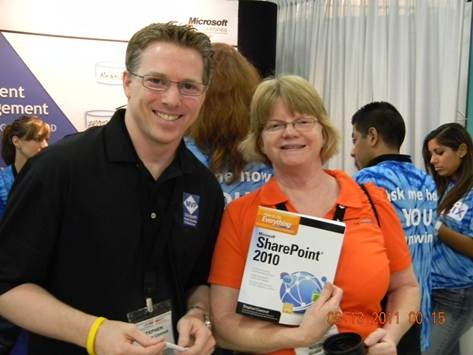
- signing a book at SPSTC in DC
And now, my shameless plug: I’ll be doing a book signing at the Metalogix booth (we’re giving away copies of How to Do Everything: SharePoint 2010) and I’ll be co-presenting a session with Dr. Steve Marsh, on Thursday, October 6, at noon. The session is entitled, “At Last - Size Doesn’t Matter! Considerations for building a SharePoint ECM platform to accommodate TBs of Content” and will focus on three different customer scenarios that demonstrate how to free your SharePoint content.

- the Metalogix billboard on Interstate 105 in Anaheim
I’ve been meaning to write a post about how Microsoft Office OneNote has improved my productivity, but really, who has the time? OK, sorry no more of that. Today, Microsoft announced that the Office OneNote iPhone app will be free for a limited time. (It was published to the Canadian app store last week). Now I can use the same TODO list on my PC, online and on my phone--all nicely synchronized.

- the new OneNote iPhone app
I only recently became a devoted OneNote user. I know, I know… What took me so long? Well, I don’t have a great excuse. When I tried the first OneNote Beta build, it wasn’t able to create tables—obviously, it had far fewer features than the current release—but the inability to create tables was a deal breaker for me. Since then, I’ve seen a flood of people adopt OneNote and sing its praises. I often questioned if I was missing out, but I kept holding back. I’m a big Outlook fan and I just kept using Outlook for everything. E-mail, appointments, reminders… Why not keep notes in there as well? That’s what I did, but lately my inbox was getting the best of me and despite my best efforts, I could use some help. (I wrote about managing my Outlook inbox in my post, Don’t be an E-mail Hoarder–Improve Your Outlook Productivity.)
So what was I waiting for? It turns out that the killer feature for me was the ability to use Windows Live SkyDrive to synchronize my OneNote notebooks across multiples machines and the OneNote Web App. And, of course, as of today, my phone as well.
For me, the ability to share OneNote notebooks effortlessly across devices is a game changer. I can make notes at work, update them online and then when I grab my laptop, I can rest assured that it will update automatically when I go online. The cloud-based synchronization also means that my notebooks are automatically backed up for me—a hard drive crash isn’t going to mean any note data loss at all. The fact that SkyDrive, the OneNote web app, and the iPhone app are all free is a nice bonus.
If you’re still not sold on OneNote, take a look at the OneNote blog post about using OneNote notebooks to plan a vacation.

- Use the Office Web Apps version of OneNote to work with your notebooks online.
I’m happy that I finally took the time to investigate what OneNote can do and I don’t see myself giving up this excellent productivity tool. If nothing else, it will as least give my Outlook inbox a bit of a break.
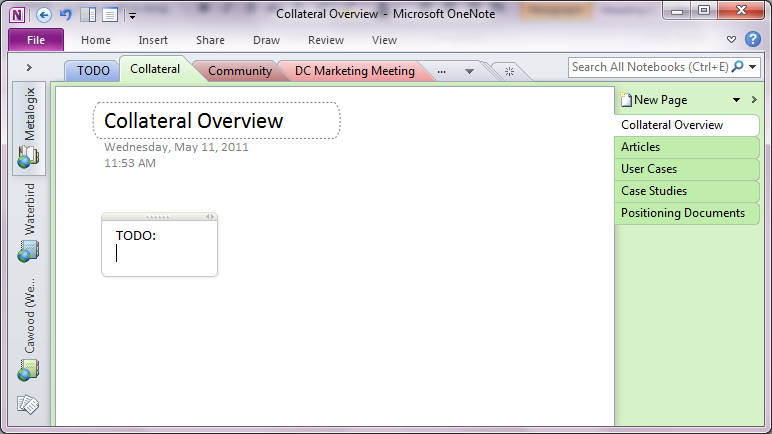
- The Office client version of OneNote
Not long ago, I posted a defence of Twitter called Twitter for Business: Beyond what you had for lunch. That post focused on the value and benefits of the Twitter service—emphasising that Twitter is open, democratic and acts as an instant worldwide bulletin board.
In the first post, my goal was to distinguish the legitimate value of Twitter from the widespread misunderstanding that Twitter is just people ranting about their pets and what they last ate. I didn’t cover the nuts and bolts of how to actually use Twitter for business and how to distinguish your marketing efforts from simple automated tweets—the ‘sock puppets’ for hire.
The reason I didn’t cover the ins and outs of using Twitter in the first post is simple that Twitter is not new; it has been around for many years and it should be the case that most people on Twitter understand how to use it. However, that’s not necessarily true. I’ve seen plenty of examples recently in the Microsoft SharePoint community of tweets that demonstrate a lack of understanding of the basics of Twitter. So here’s a quick refresher on using tweets.
Let’s get a quick one out of the way first. Do not tweet with the Caps Lock key. Just like other media—such as e-mail, newsgroups, forums, and texting—the convention on Twitter is that writing in all caps is tantamount to shouting. Don’t do it unless your team just won the Stanley cup or your daughter just got accepted to med school. In a business context, it’s easier—don’t do it.
(Ironic Note: The Heading 2 tag of this blog changes text to all caps, and the title of this blog template is always in caps. Let’s say that’s the exception that proves the rule.)
Are hashtags important? Absolutely! (Or should I write, “ABSOLUTELY"!”?). Hashtags (the # symbol) are one of the best ways to get your tweets read and to attract new Twitter followers.
Hashtags started out as a workaround to the fact that there isn’t editable metadata associated with tweets. In other words, you can’t add your own taxonomy tags (like the categories on this blog) and use them to categorize or search. People would follow the @hashtags Twitter account and their tweets would be added to the data store that hashtags.org collects about tweets. Or in their own words, “Hashtags.org is the defacto standard for hashtag information. The # symbol, called a hashtag, is used to mark keyword or topic in a Tweet. Any Twitter user can categorize or follow topics with hashtags.”
This mechanism allows Twitter users to identify ‘trending’ topics or keep track of messages about a certain topic by searching for the hashtag. While it’s true that lots of people only read tweets coming through on the feed from the accounts they follow, it’s also true that many people set up searches on particular topics and read those feeds as well. In fact, if you’re a heavy Twitter user, these may be the only feeds you read.
But you’re saying to yourself, “I can create my own keyword search in my favourite Twitter client, so why do I need hashtags?” Yes, it’s true that you can create you own search using any words and look for tweets about a particular topic. However, let’s say you were interested in Microsoft’s cloud development framework: Windows Azure. If you were to create a Twitter search for “azure,” you would get all sorts of noise that didn’t interest you. For example, messages such as, “I’m putting up new drapes. I think I’ll go with azure.” On the other hand, if you use the hashtag #azure, then you know that you’ll only be reading tweets about Windows Azure. Hashtags are also a convenient shorthand for phrases that would otherwise be too long for convenient Twitter usage. For example, the 2011 Microsoft SharePoint Conference is nicely abbreviated to: SPC11, so I can search for that tag to follow tweets about the event. In many cases, these tags are advertised on websites, but often they are organically spawned by the community.
If you are using Twitter for business then you want to ensure that your tweets are reaching the right audience. In the previous example, any tweets that you put out without the # symbol before the word “azure” would not reach the enthusiastic Azure development community. In other words, you may as well not be tweeting. Note that you only need to use these symbols once for each tweet, so “#SharePoint is cool. I like #SharePoint” is not necessary. Just use the hashtag once. Otherwise you’re wasting characters and demonstrating a lack of understanding of the Twitter medium.
At the beginning of this post, I mentioned that one dimension of Twitter that I’ll be touching on is how to gain more followers. Using hashtags is an excellent example of how to use Twitter tools to increase your followers. If your fascinating tweets consistently show up under a particular topic, the people interested in that topic will follow you.
In the current generation of Twitter clients, hashtags have taken on even more importance because the creative client developers have added some features that make them even more user-friendly. Personally, I use the TweetDeck client and adding search columns for hashtags is ridiculously easy, you literally click on a hashtag and you’re done; TweetDeck will create the search column for you.
Here’s some more information about hashtags from Wikipedia:
“Short messages on services such as Twitter, FriendFeed or identi.ca may be tagged by including one or more hashtags: words or phrases prefixed with a hash symbol (#) … Then, a person can search for … this tagged word will appear in the search engine results. These hashtags also show up in a number of trending topics websites, including Twitter's own front page. … The feature has been added to other, non-short-message-oriented services, such as the user comment systems on YouTube and Gawker Media … Real-time search aggregators such as Google Real-Time Search also support hashtags in syndicated posts, meaning that hashtags inserted into Twitter posts can be hyperlinked to incoming posts falling under that same hashtag.”
Just like hash tags, the @ tag is a fundamental tool in the Twitter toolbox. Instead of writing, “I like Windows Azure,” you should tweet, “I like @WindowsAzure.” The difference may seem minimal, but it is key. The former is just text, the latter is the Twitter account name. Most Twitter users will monitor their ‘mentions.’ By using the account name instead of just a string of text, you’re alerting the user that someone has tweeted about them specifically—not just the subject in general. These mentions are often reciprocated by ’retweets’ (the next topic) and follows. Of course, this example applies when there is actually an official account. It would be harder to do this if your tweet was about wood or milk—although I’ve seen TV ads for both, so maybe not.
If you want people to notice you on Twitter, one of the best ways is to mention their personal account or their organization’s account in your tweets—it’s all about building a buzz and people won’t build you up if you don’t reciprocate. Furthermore, if you’re tweeting about your own organization, you should use your account name—with the @ symbol—so that any retweets show up in your twitter mentions. Mentions are another example of a feature that Twitter clients leverage. By tracking your mentions, it makes it simpler to keep track of who is tweeting about you.
A ‘retweet’ is the real power of Twitter; it’s like the old shampoo commercial, when someone retweets, you’ll tell two friends and they’ll tell two friends, etc. More retweets means more people will see your message (generally speaking) and you’ll have a wider audience. When a user retweets a tweet, they use the convention “RT “ and then the original users account name “@account:” to give credit to the person who first tweeted the message. Lack of the “RT “ convention in the same message sent out by multiple accounts is often an effective way to detect sock puppet accounts.
When you retweet, the user’s account will be included in the tweet, so the longer your account name, the shorter your tweets can be—if you want to make them easy to reweet, and you should. I like to call this the ‘Twitter tax’ since it take away characters that you’d be able to use. For example, my Twitter account is @cawood, so my Twitter tax is 10 characters because I also need to add the three characters used by “RT “. Every time I write a tweet that I want others to tweet, I should limit it to 140 – 7 – 3 = 130 characters. I don’t have to do this, but it makes my tweet easier to retweet and therefore reduces friction.
It is considered bad form to retweet someone else’s tweet without giving them credit (i.e., leaving off their account name). In the case where their “twitter tax” is too high to allow you to do a simple retweet, you can edit the message to allow it to work. I often have to edit tweets to retweet them properly. When I do this, I make sure that the spirit of the original tweet is maintained. Misquoting a tweet is a really bad idea.
If you are following an account, and that account is also following you, you will be able to send direct messages back and forth. These “DMs” allow you to have a private conversation over Twitter. For example, if you wanted to share your contact information with one account, but not send it out publicly. DMs are also a good way to send constructive feedback without publicly criticizing someone.
If you don’t want your twitter account to seem like a mindless sock puppet for hire, then make sure you actually engage in some social activity on the social network. Account’s that just send out retweets don’t have a personal feel and aren’t as likely to attract followers—which is conveniently the next topic.
The simplest means to attract twitter followers is to have a focused account about a subject that interests you and then send out a reasonable number of tweets. If you send 20 tweets in a row, many users will find you too chatty and stop following. The appropriate number will vary, but understand that you can send out too many or too few tweets.
- Search for popular accounts that are also focused on your field of interest and follow them. Even if you don’t plan to read your Twitter feed regularly, you should follow these accounts because it will raise your profile. Some accounts will reciprocate your follow as a gesture of good will.
- Set up a search for hashtags relevant to your subject matter. Twitter clients such as TweetDeck are great for this.
- Retweet interesting tweets to get noticed by more accounts.
- Send messages to users answering questions or commenting on their tweets. In other words, engage.
There are services out that that advertise the ability to increase your Twitter followership. I haven’t looked into that option, because it seems like you’d just get a bunch of phony accounts building up your now meaningless follower number. However, it’s possible that I’m wrong about this, so I’ll just say that you can check out that option if it interests you.
Follow me on Twitter: @cawood
To read more about Twitter, you can read the Twitter usage Wikipedia article.
As you can see by the “old school” counter below, geeklit recently passed the 400,000 page views mark. (Yes, that’s views, not hits, so 400,000 people saw one page, or if it was one person—well that person really likes my blog.) This has me feeling a little nostalgic about the path that this blog has taken.
In the early days, it was very much about Halo. (And trying to be an advocate for legitimate Halo modders. Modding isn’t about cheating damn it!) The first post for this blog was written Monday, January 31, 2005 and the majority of the posts at that time were about my Halo books: Black Art of Halo Mods (Sams), Halo 2 Hacks (O'Reilly) and Halo 2 Battle Guide (Thompson). There was also some content about Microsoft Content Management Server (MCMS) and the book I co-authored about that software: MCMS: A Complete Guide (AW). I don’t feel bad ‘plugging’ these titles because they’re so old now that I don’t think anyone is interested in paying for them anymore.

- this image was in the first post with the caption “I don't recall whether this was staged or not”
Of course, after leaving Microsoft, I eventually made it back into the fold (although writing books about Halo and XNA—how far did I really roam?) when I joined metalogix and started blogging and writing books about content management again—of course, Microsoft had consolidated on SharePoint by that point.
I’ve had people tell me over the years that my blog is eclectic, and I’ve always agreed with that assessment. Whether it was chronicling a drive across Canada, or writing about some development topic such as adding Growl/Prowl push notifications to SharePoint applications, I have jumped around a bit.
There is a common thread though, whether it’s Halo, MCMS, SharePoint, coding for XNA, or even highlighting the no left turn to Tim Hortons sign in Fredericton, it’s all pretty geeky.
Since Twitter launched in 2006, I’ve heard many criticisms of the short message communication system. Some of the limitations of Twitter are obvious—after all, you can’t expect to be able to express every idea in 140 characters or less. However, I’ve also found that many hacks against Twitter are unfounded and stem from a lack of understanding about how Twitter works and the value it can add. This is particularly true in the context of using Twitter for business purposes.
Recent events have shown that Twitter has profound value in other contexts. For example, political rallies or disaster scenarios. Messages can be sent about demonstration locations or places to find food and shelter. I successfully use Twitter to keep up-to-date on what’s happening in the Microsoft SharePoint community, so I take it a little personally when someone claims that the technology has no value. Here’s a quick defense of the value of Twitter for business.
Update: I’ve now posted a second part to this post: Twitter for Business Part 2: Twitter Usage and Etiquette
Twitter is Open
Some people love to rant that, “Twitter makes no sense because we already have Facebook status.” What these people don’t realize is that unlike Facebook status, Twitter is open. Sure, the Twitter direct message (“DM”) system can be used for private messages, but most messages are not sent as DMs; most Twitter messages are public.
What this means is that any user has the ability to ‘follow’ any other user and read their messages. I doubt Bill Gates would accept a friend request from me, but I can follow him on Twitter to see how his foundation is faring in its fight against polio. Once you’re following a user, it makes it easier for you to see their messages—a.k.a. tweets—but you’re not even required to follow someone to read their tweets. You can visit their Twitter page anonymously and read what they’ve written.
This is great for business because anyone interested in a particular subject—let’s say SharePoint migration software from Metalogix—can read tweets by @metalogix or create a search for tweets with “SharePoint” in the text (or “#SharePoint” if you prefer Twitter hashtags). In other words, if I send out a tweet with key terms, I know that I’ll be reaching an audience interested in those subjects.
Twitter is Democratic
With the exception of some “Who to follow” or “Highlighted users” suggestions, Twitter is largely a democratic system. Each user chooses who he or she will follow and whether a tweet becomes popular depends on how many users choose to ‘retweet’ it. This is radically different than traditional marketing or public relations because business users might choose to follow a software developer’s account instead of the corporate PR account. This must be frightening to old school media types, but companies that effectively use Twitter can reach audiences that might otherwise simply ignore their marketing efforts.
Hypothetically, I might not want to follow a movie studio’s twitter account, but if I choose to read the tweets of an actor starring in one of their movies, I would still see some (maybe a lot?) of plugs for their movie.
Twitter is an Instant Worldwide Bulletin Board
The most common complaint I hear about Twitter is that it’s used for glib messages that no ones cares about. In an episode of the TV show Criminal Minds, a killer tracked social networking users who sent out tweets such as, “Mmm scones.” This is the sort of thing that many associate with Twitter. So much so that, I’ve heard Twitter called “keyboard masturbation.” What these critics need to realize is that those using Twitter in a business context aren’t going to behave this way.
Think of standing on a corner and having a constant flow of people walking by giving you Post-It Notes about the subjects that interest you. It can be incredibly useful and powerful to have that sort of instant access to what people are typing about any subject at any point in time.
When someone tries to put down Twitter, I simply say that if I follow someone for business reasons, and all he does is tweet what he had for lunch (not that I’ve ever done that), I’ll just unfollow him. Besides, it’s a lot less insulting than being un-friended.
Update: I’ve now posted a second part to this post: Twitter for Business Part 2: Twitter Usage and Etiquette
Follow me on Twitter: @cawood
This weekend, comedian Jon Stewart, from The Daily Show, will be leading a rally in Washington, DC called Rally to Restore Sanity.
Some opponents have made strong negative statements about this event, but I have to say that it makes perfect sense to me. From the perspective of someone outside the system, it seems quite clear that a portion of the media and some politicians in the U.S.A. have convinced a lot of people that they cannot have a rational conversation with someone who doesn’t share their ideology. This creates a toxic environment where people cannot reach reasonable compromises, and it also paralyzes the government because politicians are more loyal to the concept of fighting the other party than they are to their personal values.
So, why would anyone criticize a rally designed to promote rational conversation? Why wouldn’t someone support a forum for people who aren’t extremists? Perhaps because they’re part of the problem.