Showing posts with label golang. Show all posts

Thursday, August 22, 2013

GoREST (golang web services) Simple Examples

In my last post, Installing GoREST on Ubuntu Linux, I mentioned that I should really post a simple example of using GoREST. Here’s some example code for a Get and Post request using GoREST web services in golang.

Note that I’m also using the go-sql-driver/mysql driver for MySQL in golang. To install the driver, simply run:

$ go get github.com/go-sql-driver/mysql

Also, this example isn’t actually using JSON. Check out the link at the end of this post for a JSON example.

package main
import (
      "code.google.com/p/gorest"
    _ "github.com/go-sql-driver/mysql"
      "database/sql"
      "net/http"
      "log"
      "time"
      "os"
      "strconv"
)

func main() {
    // GoREST usage: http://localhost:8181/tutorial/hello
    gorest.RegisterService(new(Tutorial)) //Register our service
    http.Handle("/",gorest.Handle())    
    http.ListenAndServe(":8181",nil)
}

//Service Definition
type Tutorial struct {
    gorest.RestService `root:"/tutorial/" consumes:"application/json" produces:"application/json"`
    hello  gorest.EndPoint `method:"GET" path:"/hello/" output:"string"`
    insert   gorest.EndPoint `method:"POST" path:"/insert/" postdata:"int"`
}

func(serv Tutorial) Hello() string{
    return "Hello World"
}

func(serv Tutorial) Insert(number int) {
    db, err := sql.Open("mysql", "root:password@/dbname?charset=utf8")
    db.Exec("INSERT INTO table (number) VALUES(strconv.Itoa(number) + ");")
    db.Close()
    serv.ResponseBuilder().SetResponseCode(200)
}

I’m using Postman REST Client for my post tests, you can download Postman for free from the Chrome web store. (Blog post on using Postman with JSON.)

image

Monday, August 19, 2013

Installing GoREST on Ubuntu Linux

Previous posts on setting up a developer environment on an Ubuntu Linux virtual machine running on Windows Azure:
- Linux (Ubuntu) Virtual Machine on Windows Azure
- Remote Access to Ubuntu Linux VM on Windows Azure
- Installing LAMP on Ubuntu
- Installing Git on Ubuntu Linux

GoREST is a useful RESTful style web-services framework for the Go (golang) language. The commands to install GoREST are simple, but there’s more than one step involved. Although, having said that, this post will still be really light, so I’ll have to make sure I write another one soon with some GoREST examples. (Update: I wrote a post with some simple examples: GoREST (golang web services) Simple Examples)

First, you’ll need to install Mercurial so that you can run the “go get” command for GoREST:

$ sudo apt-get install mercurial

image

Next, run the command to install GoREST:

$ sudo go get code.google.com/p/gorest

The GoREST install is silent, so you won’t see any feedback.  My advice is to have a simple Hello World style example ready to go, so you can test your GoREST install.

Installing Go (golang) on Ubuntu Linux

Previous posts:
- Linux (Ubuntu) Virtual Machine on Windows Azure
- Remote Access to Ubuntu Linux VM on Windows Azure
- Installing LAMP on Ubuntu
- Installing Git on Ubuntu Linux

As part of my series on setting up a development environment on Ubuntu Linux running in Windows Azure, here are the steps to install and test the Go (golang) language.

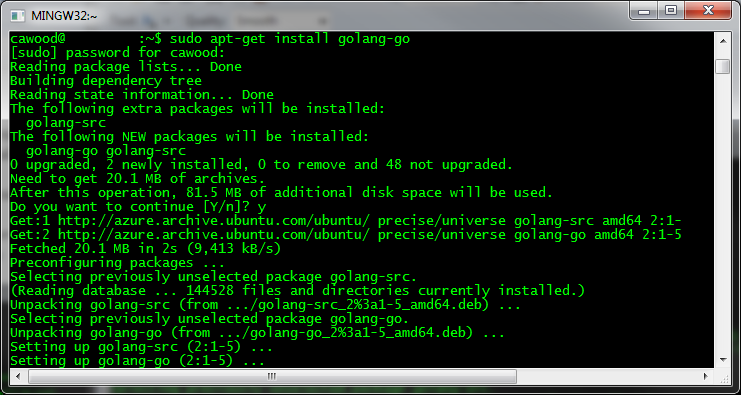
First you have to SSH to your VM and install Go, which is super easy. Note that apt-get might not install the latest version of Go, see thread on Stack Overflow about installing latest version of Go.

$ ssh -p portnumber username@yourvmname.cloudapp.net
$
sudo apt-get install golang-go

image

You’ll be asking whether or not you’d like to participate in a program to track which packages are being installed.

image

To check that it’s installed, you can run: $ go version

You may want to do some additional customization. For more details, refer to this post: How to Install Google Go in Ubuntu by Joshua Price.