Thursday, June 17, 2010

SharePoint 2010 Phantom Web Part Error

I've been playing around with SharePoint 2010 visual web parts and I happened to find that one of my old—and deleted—sample parts was still (unsuccessfully) being loaded on the server. The web part did not exist on the page (at least it didn’t appear anywhere in published or edit more) and it had been deleted from the web part galleries.

I stumbled across the error when I enabled the SharePoint  2010 developer dashboard on the home page of my server. The web part errors appeared in the “Asserts and Critical Events” section of the dashboard.

To get rid of the error, I put the page in edit mode and removed all the white space (just a line break or two from the main content area on the page. (I also added and removed a different web part, but I’m not sure that it had any effect.) Now I don’t get the error… crazy.

image                               - The developer dashboard no longer shows any critical errors

Here’s the error from the SharePoint developer dashboard:

Web Parts 18 7935 http://sp2010/SitePages/Home.aspx - An unexpected error has been encountered in this Web Part.  Error: A Web Part or Web Form Control on this Page cannot be displayed or imported. The type VisualWebPartProject2.VisualWebPart1.VisualWebPart1, VisualWebPartProject2, Version=1.0.0.0, Culture=neutral, PublicKeyToken=50d4a10608bc4e38 could not be found or it is not registered as safe., Source: [UnsafeControlException: A Web Part or Web Form Control on this Page cannot be displayed or imported. The type VisualWebPartProject2.VisualWebPart1.VisualWebPart1, VisualWebPartProject2, Version=1.0.0.0, Culture=neutral, PublicKeyToken=50d4a10608bc4e38 could not be found or it is not registered as safe.]<br/>&#160;   at Microsoft.SharePoint.ApplicationRuntime.SafeControls.GetTypeFromGuid(Guid guid, Guid solutionId, String assemblyFullName, String typeFullName, Boolean throwIfNotFound)
<br/>&#160;   at Microsoft.SharePoint.WebPartPages.SPWebPartManager.CreateWebPartsFromRowSetData(Boolean onlyInitializeClosedWebParts)

Tuesday, June 15, 2010

Halifax SharePint Tomorrow

sparepintlargeblack

There will be a SharePint tomorrow in Halifax, Canada!

Wednesday, June 16th at Durty Nelly's Irish Pub. 6pm

hugsharepoint_logo

For future events, follow @HUGSharePoint on Twitter and check out http://www.hugsharepoint.org.

Thursday, June 10, 2010

Windows Live Mesh Beta - Free

A while ago, I wrote a post about SyncToy. It’s a free utility that let’s you sync folders across computers. Well, now I have something even better to blog about. I switched over to Windows Live Mesh (Beta) a few months ago and I’m really happy with it.

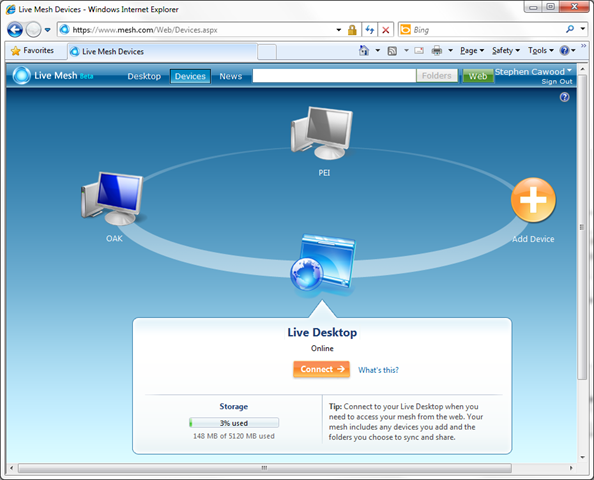
image - Use the online interface to add devices to Live Mesh

Live Mesh allows you to quickly and easily share folders amongst machines that have network access. All you have to do it install a small app and then create folders. In the Beta, you get 5GB for free and both 32bit and 64bit machines are supported. I was particularly happy to find that Windows Server 2008 R2 64bit works because I’m a SharePoint guy and that’s what I run at Metalogix.

Once you have set it up, you can rest easy as the folders are synchronized in the background. For example, I just went to the Microsoft TechEd conference and I knew getting on the plane that my laptop was in sync with my shared folder at work. In a sense, Live Mesh is like a USB key that you don’t need to carry with you.

image - A Live Mesh folder showing two devices are synchronized

Also note that Live Mesh offers a remote desktop option that allows you to remote to the computers that are being used. This adds tremendous value since most networks use DHCP and you can't be sure which IP to connect to unless you install something like DynDNS. In other words, connecting to work might be easy, but connecting to home can be more of a challenge; Live Mesh resolves that challenge.

Sunday, May 30, 2010

Minor Surgery

I had to go in for a minor procedure yesterday. I’m at home recovering and all went well.

A few years ago, I was snowboarding in Whistler and I tore my abdominal wall. I didn’t feel anything at the time and it wasn’t until a couple of days later that I noticed a bump around my navel—I basically became an outy when I used to be an inny. I had no idea what it was, but fortunately my wife is an M.D. and she immediately said “that looks like an umbilical hernia.” I hadn’t heard of it before, but it’s quite common.

The procedure is so minor that I prefer not to use the term umbilical hernia. It just makes it sound a lot worse. Most people associate the word “hernia” with inguinal hernias and those are much worse. Many people have congenital umbilical hernias and might never have them repaired. In fact, when I originally had my surgical consult, the surgeon recommended a wait and see approach. Even with Jujitsu and Water Polo, there was a chance that I wouldn’t have to be opened up, and that suited me just fine.

Unfortunately, the hole was getting larger and yesterday I went in to get stitched up. I have only had surgery once before and that was on a finger, so other than getting sick from the general anesthetic, I didn’t have to deal with much discomfort. This time around I only needed local anesthetic and obviously, that meant I was conscious during the procedure.

It wasn’t fun feeling the numbed sensations of the surgeons cutting, clamping and sewing up my insides, but I know some people who have had much more involved surgeries lately, so I really can’t complain about half an hour of discomfort and then a few sore days. I’ll be back at Jujitsu, running and in the pool in a few weeks.

Monday, May 17, 2010

SharePoint Saturday in DC

Thank you to the organizers of SPS DC for an impressive SharePoint Saturday gathering this weekend. I hear the final count was 929 people—including 90 speakers who presented over 100 sessions. I co-presented a session on SharePoint 2010 migration and storage optimization.

Unfortunately, I didn’t manage to get a video of @meetdux rapping during the keynote—hopefully, someone will post it to YouTube. It was along the same lines as the SharePoint is Nice Nice Baby BPC09 Remix, except this one was to the tune of Empire State of Mind.

photo4

Metalogix was a platinum sponsor at the event, so obviously we had a booth and were talking to lots of people about how they can use Metalogix software to upgrade to SharePoint 2010, migrate content from other systems to SharePoint 2010, improve SharePoint performance with StoragePoint, archive SharePoint and many other topics.

SharePoint Coast is here

I had an idea to create a blog called SharePoint Coast to highlight interesting and memorable things going on in the Microsoft SharePoint community. The emphasis was meant to be on the SharePoint Coast Hall of Fame. (If you’d like to nominate a worthy entry, please send a message to @cawood on Twitter.)

However, after realizing that I didn’t have the time to create a template for the blog, I have to accept that I simply don’t have the time to do a good job on two blogs. For this reason, I’ve moved the posts over to this blog.

At least I got to do a Halo mod…

SharePoint Community Hall of Fame

The goal for this post is to provide links to the most interesting things that have been done in the SharePoint community. Please send your nominations to @cawood on Twitter.

Let’s get going—envelope please!

Best SharePoint Jingle

Bamboo Solutions web parts for SharePoint by therockcookiebottom

Best SharePoint Jokes

Check Norrie SharePoint jokes by SharePoint Comic

Honourable mention: Top 20 SharePoint Pickup Lines by The SharePoint Hillbilly

Best SharePoint Social Activity

Andrew Connell’s SharePint.

sparepintlargeblack

SharePoint Reviews posted an article about SharePint. Here are some SharePint logos.

Best SharePoint Ad Video

Microsoft Russia video explaining the benefits of SharePoint

Note: I think this was created by Microsoft Russia, but someone can correct me if that’s not true.

Best SharePoint Conference Contest

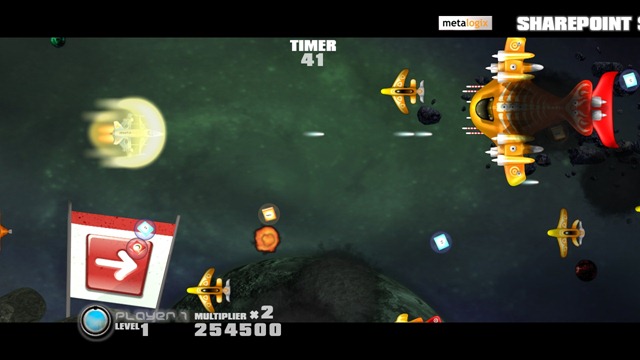
SharePoint Shooters custom Xbox 360 video game from Metalogix.

Gameplay

- SharePoint Shooters game play

Best SharePoint Conference Giveaway

The Colligo “Share” shirt

ColligoShareShirt_SharePointCoast

- totally posed btw

Best Digital Decorations

SharePoint 2010 wallpapers by SharePoint Comic

SharePoint2010Wallpaper

Thursday, May 13, 2010

How to Do Everything SharePoint 2010

I’m thrilled to announce that my latest book project is an end-user SharePoint 2010 book called How to Do Everything: Microsoft SharePoint 2010. My good friend, Arpan Shah, Microsoft Director of Technical Product Management for SharePoint, has contributed a section on the history of SharePoint and also written the foreword.

What I tried to do in this book is focus on the most important cases for the day-to-day user, but also provide an insight into power user and administrative tasks. With only ~315 pages, there’s only so much that I could cover. I trust readers are conscious of the fact that the “How to Do Everything” series name doesn’t mean that all of SharePoint can be summed up in one book. This book is squarely focused at the end-user.

image

The publisher is McGraw-Hill Osborne Media and I’m excited to be working with them again. The book will be on shelves this summer. However, you can order your copy today from the Amazon and McGraw-Hill sites.

Here’s some text from the book description:

"Written by a former member of the SharePoint development team, this is a step-by-step guide to mastering the latest release of this integrated suite of server capabilities.In How to Do Everything: Microsoft SharePoint 2010, Stephen Cawood—one of the people who helped build SharePoint—offers advice from his many years of working with SharePoint customers, cutting to the core and focusing on key features to get you up to speed quickly. You’ll get easy-to-follow tutorials on blogs, wikis, My Sites, Web parts, taxonomy, document management, workflow, publishing sites, team sites, and much more. Take full advantage of the content management, enterprise search, collaboration, and information-sharing capabilities of SharePoint 2010 with help from this practical guide."

Wednesday, May 12, 2010

Happy Birthday Microsoft SharePoint 2010!

For those of us who work in the content management space, today was a very important day. Microsoft has officially launched Microsoft SharePoint 2010. SharePoint 2010 is clearly going to be the largest release of SharePoint ever—the largest release of ANY information management platform ever.

image                                          - The Metalogix Halifax SharePoint 2010 birthday cake

At Metalogix, we were also thrilled to be included in Microsoft’s keynote presentation as one of the key SharePoint Gold Certified Partners. Here is the slide that Stephen Elop, President, Microsoft Business Division used in his presentation.

image

Tuesday, May 11, 2010

SharePoint 2010 Taxonomy Web Part Development Screencast

I have posted another video demo on the Metalogix blog. The SharePoint 2010 Taxonomy Web Part Development Screencast demonstrates how to create a Microsoft SharePoint 2010 Visual Web Part that uses the new Taxonomy API. The Taxonomy API is one of the Enterprise Metadata Management features provided in SharePoint 2010.

You can get the code used in this example in my blog series on SharePoint 2010 Enterprise Metadata Management (a.k.a. Taxonomy).

image

Metalogix is a Platinum Sponsor of Microsoft’s Official SharePoint 2010 Launch Tour. Come see Metalogix product in action and speak with a Metalogix representative at one of these SharePoint 2010 Launch Tour Events.

Monday, May 10, 2010

Business in Vancouver Interview about Augmented Reality

Curt Cherewayko from Business in Vancouver recently interviewed me about my book, Pragmatic Augmented Reality.

It is quite clear that Augmented Reality (AR) has caught the attention of many developers and reporters. But as I was quoted as saying in the Business in Vancouver article, people probably “won’t know the underlying technology is augmented reality. They’ll just accept that this is the way it works.”

SharePoint Site Migration Manager 2010 PowerShell Screencast

This screencast shows a quick demo of how anyone can easily use Metalogix SharePoint Site Migration Manager (SSMM) 2010 to generate PowerShell scripts for upgrading, migrating or managing Microsoft SharePoint.

See the screencast video here: http://www.metalogix.net/SharePoint-Site-Migration-Manager-2010-PowerShell-Screencast/

SSMM2010_PowerShellAnnotation

- The log view now contains the “Generate PowerShell Script” button

Thursday, May 06, 2010

SharePoint Site Migration Manager UI Upgrade

My latest Metalogix blog post, SharePoint Site Migration Manager 2010 UI, is live on the Metalogix blog.

image

- The new Metalogix SharePoint Site Migration Manager 2010 options dialog

image
- gotta love that ‘Generate PowerShell Script’ button

Monday, May 03, 2010

Enabling SharePoint 2010 Alerts

In case you find that your SharePoint server does not offer you the ability to add alerts (e.g., from the ribbon), here are the steps to enable alerts in SharePoint 2010. The setup isn’t very hard, but it does require a couple of changes. In order to complete this setup, you need both administrative access to Windows and to SharePoint.

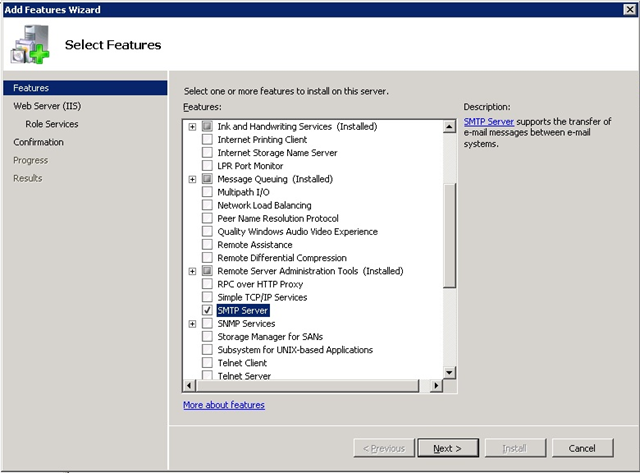
1. Install the SMTP feature on the SharePoint server. Once you have the server ready, you can set up Alerts from Central Administration.

image

- Adding the SMTP feature to the server

2. Go to Central Administration > System Settings > Configure outgoing e-mail settings and add in the appropriate details.

image

- Configuring the Outgoing E-Mail Settings in SharePoint 2010 Central Administration

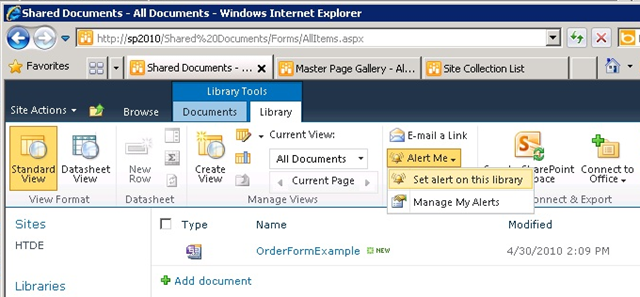
3. After you have set things up, try using the ribbon to add an alert in a document library.

image

- Choosing to add an alert from the ribbon

image

- Configuring a SharePoint alert

After adding the alert, you’ll receive e-mail messages notifying you when your criteria have been met.

Friday, April 23, 2010

SharePoint 2010 is out!

I tweeted about this yesterday when the bits actually appeared, but here are the URLs from SharePoint MVP Sean Wallbridge:

SharePoint 2010 is on MSDN.

Microsoft SharePoint Designer 2010 (32 bit)

Microsoft SharePoint Designer 2010 (64 bit)

Reminder: SharePoint Designer 2010 only connects to SharePoint 2010 sites. You will want to continue to use SharePoint Designer 2007 to connect to your WSS/MOSS sites.

Also note that you can't mix 32bit and 64bit Office versions, so you’ll want to download either Office 32bit and SPD 32bit or the 64bit versions of both.

Microsoft SharePoint Foundation 2010

image

Also, you might want to read the SharePoint 2010 hardware and software requirements

image 

- a shout out to the MCMS folks

Tuesday, April 20, 2010

Silicon is Not Religion

If blogs from the 60s existed, I’m willing to bet that there would be plenty of lamentations about how people tend to lose all sense of rational thought when they start debating computer preferences.

Another example popped up a while ago in a blog post called From MSFT evangelist to Mac enthusiast. In this post, the author suggests that he’s writing about the difference between Apple and Microsoft. In reality, as you read through each argument, it’s clear that logic is taking a back stage to opinions.

Just so you don’t think I’m falling into the same trap, here’s my viewpoint upfront. I used to work at Microsoft, I own an iPhone. I don’t have a Mac, but my wife does. I wrote about the problem of criticizing Microsoft in my post The Microsoft Paradox. I’m perfectly willing to have a good argument with someone about hardware or software—in fact, I encourage it—but I hate to see bad arguments applied to technical topics. Technology should be free of such indiscretions.

Argument #1: “The most obvious distinction between Microsoft and Apple is design”
This is when I knew I had to write this post. In a classic case of comparing apples to oranges, the writer has decided to ignore the fact that Microsoft didn’t design his computer. “My Windows machine was a Lenovo X301” he writes.

Argument #2: “End to end experience”
”One of the major advantages Apple has is controlling the end to end user experience. This means the hardware works perfectly with the software.” I’m willing to grant that if you make both the hardware and the software, this can be an advantage. However, since Apple is the only major computer manufacturer that decided to maintain this level of  “control,” you also have to acknowledge that an open system that encourages competition amongst peripheral vendors also has its advantages—like price for one.

Argument #2: “Functional differences”
The author uses multi-touch as his main functional difference between his new Mac and his old PC: ”Finally someone tipped me off that the Mac does many of the same ‘right click’ function by holding two fingers on the touchpad.” Unfortunately, this argument is exactly that, a comparison between an old computer and a new computer. As anyone who attended PDC can attest, multi-touch Windows machines have been available for some time.

The post really falls apart with the assertion “From a functional point of view you can do anything on a Mac that you can do on a PC…and vice versa.” This would have been a great chance for him to point out differences between the software available on the two systems, but he doesn’t do it. Unless he’s abstracting to the fact that one can run Windows on a Mac—I don’t think that’s where he wanted to go. I can’t use iLife on my PC and I can’t run Visual Studio on my wife’s Mac. That’s the sort of thing that a logical person would think about.

Friday, April 09, 2010

Windows Live Messenger Translation TBot

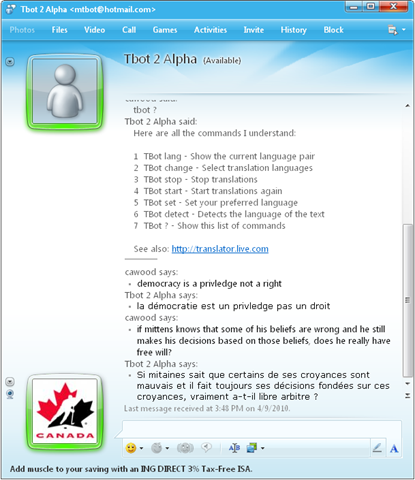
This is a very cool feature that I’ve started to use. It’s called Tbot and it will translate whatever you type into a Windows Live Messenger conversation. All you have to do is add the bot (mtbot@hotmail.com) to your messenger contacts and then start typing. Tbot will translate what you write almost instantly.

Description from Microsoft: “Tbot is an automated buddy that provides translations for Windows Live Messenger. It was first launched in 2008 as a prototype and has since become immensely popular. You can have one-on-one conversations with Tbot or invite friends who speak different languages with Tbot translating for you.
Simply add mtbot@hotmail.com to your Messenger contacts. Simply add mtbot@hotmail.com to your Messenger contacts. ”

image 
- using Tbot in Windows Live Messenger

Here are the Tbot commands:

1  TBot lang - Show the current language pair
2  TBot change - Select translation languages
3  TBot stop - Stop translations
4  TBot start - Start translations again
5  TBot set - Set your preferred language
6  TBot detect - Detects the language of the text
7  TBot ? - Show this list of commands

See also: http://translator.live.com

Tuesday, April 06, 2010

SharePoint Designer 2010 Beta and Office 2010

If you’re looking to download both the SharePoint Designer 2010 beta and the Office 2010 beta, you may have discovered that there is a 64bit public beta for SPD, but the public beta for Office 2010 is 32bit.

I installed SPD 64bit first--only to find that the 32bit Office beta wouldn’t install if a 64bit Office application was already installed.

The solution is to download the Office 2010 64bit beta from MSDN downloads.

Monday, March 29, 2010

Augmented Reality Interview for AOL News

I recently did an interview about Augmented Reality for an AOL News site (www.asylum.com). A few years ago, I co-wrote a book about Augmented Reality that was based on the work of Dr. Mark Fiala—an old friend of mine and creator of the ARTag marker system.

The writer was interested in a number of AR applications that have started to make it into mainstream culture. For example, AR tattoos are apparently gaining popularity (see video below).

- Augmented Reality tattoo

Friday, March 19, 2010

SharePoint 2010 Config Wizard Error

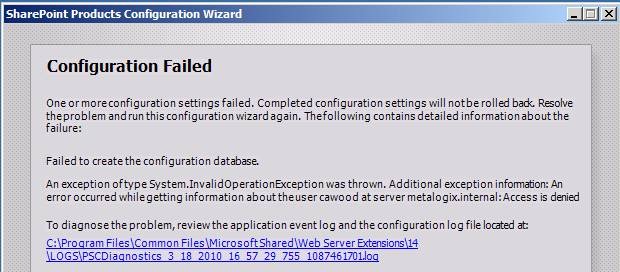
I was getting this error when trying to run the configuration wizard for the SharePoint 2010 RC Hyper-V Image.

clip_image002

In the wizard, I was specifying a domain account with sufficient permissions, but I still got the access denied error. The solution was quite simple, I had forgotten that I was logged into the machine as the local admin account—not a domain account. The config wizard needs to read some info about the domain account you’re using for the setup. When I switched users to my own domain account, the wizard ran successfully.

Here’s a snipped from the install log:

Task configdb has failed with an unknown exception 03/19/2010 06:38:14  9  ERR                    Exception: System.InvalidOperationException: An error occurred while getting information about the user SharePointAdmin at server internal: Access is denied

at Microsoft.SharePoint.Win32.SPNetApi32.NetUserGetInfo1(String server, String name
at Microsoft.SharePoint.Administration.SPManagedAccount.GetUserAccountControl(String username)
at Microsoft.SharePoint.Administration.SPManagedAccount.Update()
at Microsoft.SharePoint.Administration.SPProcessIdentity.Update()
at Microsoft.SharePoint.Administration.SPApplicationPool.Update()
at Microsoft.SharePoint.Administration.SPWebApplication.CreateDefaultInstance(SPWebService service, Guid id, String applicationPoolId, SPProcessAccount processAccount, String iisServerComment, Boolean secureSocketsLayer, String iisHostHeader, Int32 iisPort, Boolean iisAllowAnonymous, DirectoryInfo iisRootDirectory, Uri defaultZoneUri, Boolean iisEnsureNTLM, Boolean createDatabase, String databaseServer, String databaseName, String databaseUsername, String databasePassword, SPSearchServiceInstance searchServiceInstance, Boolean autoActivateFeatures)