Monday, March 05, 2012

BPOS Upgraded to Office 365–Why Does it Look the Same?

Obviously, there’s a lot more to Office 365 than SharePoint Online. The Microsoft Online Services offering also includes Exchange Online for email, Lync Online for communication, the Office Web Apps, and some plans even include a copy of Office Professional Plus. But I’ll let others blog about the various pieces—this post is about SharePoint Online.

If you have a Business Productivity Online Suite (BPOS) account, you’ll know that BPOS comes with Microsoft Office SharePoint Server 2007 (MOSS) and Office 365 comes with SharePoint Server 2010. Since I work for a Microsoft Partner, Metalogix Software, my GovernanceHx project is part of the BizSpark program, and I’m a Microsoft MVP, I have a few different SharePoint Online accounts—including both BPOS and Office 365. One of these accounts was recently upgraded from BPOS to Office 365, so I’ve experienced the SharePoint upgrade firsthand.
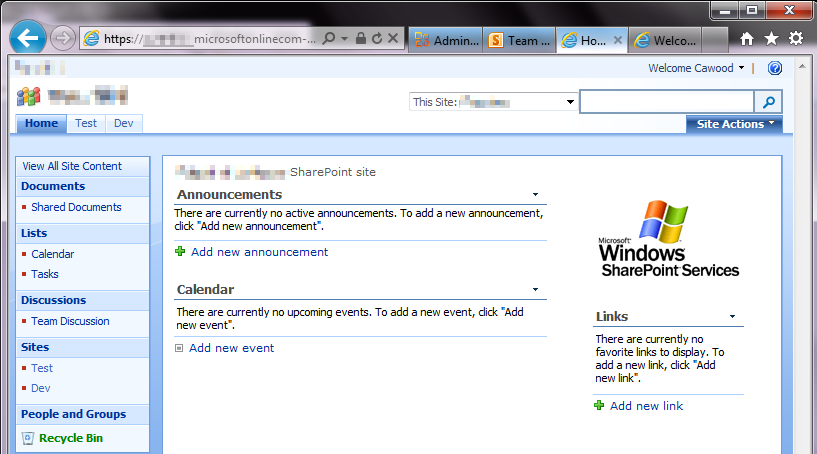
BPOS Site Upgraded Office 365 geeklit.com stephen cawood
- A BPOS SharePoint site upgraded to Office 365

The funny thing about the SharePoint Online portion of the upgrade is that it’s really hard to tell that anything has happened. Sure, you get an email that advises you that your site is ready for upgrade, but when you actually visit your SharePoint Online site, it looks exactly the same. Well, we all know that looks can be deceiving.

If, however, you enter using the Team Site link from the Office 365 customer portal, you’ll be taken to a spanky new SharePoint Server 2010 site. This is actually a new page; the BPOS content retains the same URL after the upgrade and a link will be added to your new home page.
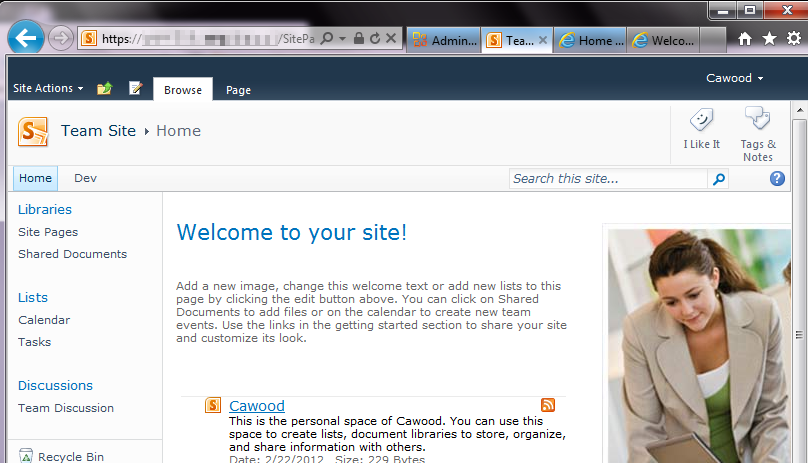
Office365SharePointOnline_Edit
- The SharePoint “Team Site” home page after BPOS (MOSS 2007) is upgraded to Office 365 (SharePoint 2010)

So why does the BPOS SharePoint Online content still look like MOSS? It’s actually a feature of SharePoint Server 2010. Specifically, the “Visual Upgrade” feature. Visual Upgrade allows MOSS sites to be upgraded to 2010 without changing the look and feel. This is meant to ease the transition to the new version of SharePoint. A site admin can go to the site settings and choose to upgrade to the SharePoint 2010 look and feel. When a BPOS site is upgraded to Office 365, the SharePoint Online content is put in a site collection under the Office 365 account.

To see the site collections, go to the Microsoft Online Services (Office 365) Administration portal and scroll down to SharePoint Online. Once there, click the “Manage” link. This opens the SharePoint Online Administration Center. Next, click on “Site Collections” to see the Office 365 site collections that were provisioned for you during the upgrade.

Office 365 Admin geeklit.com stephen cawood
- The Office 365 administration interface

Here you’ll see that there’s a new site collection under your Office 365 domain name (yes, the Office 365 URLs are much nicer than the old BPOS mouthful), and that there’s one for your MySites (a feature that wasn’t available in BPOS), as well as one for your old BPOS content. If you don’t want to use the new SharePoint 2010 interface, that’s your choice, but personally, I’d go for it.
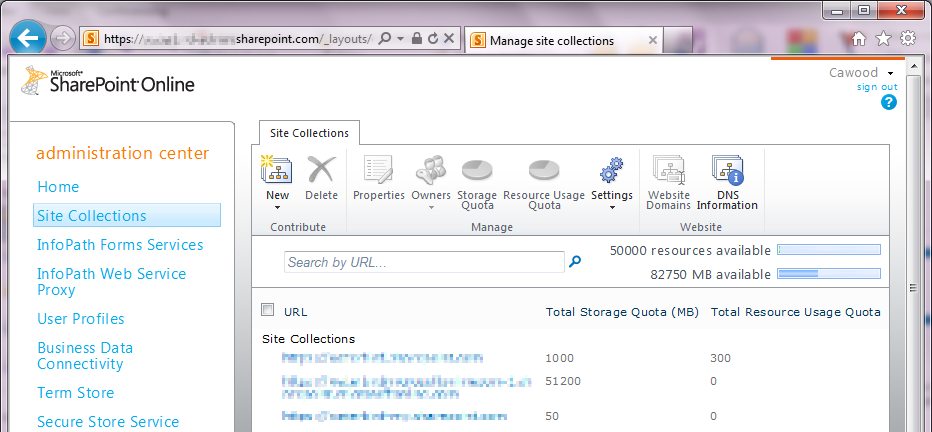
Office 365 SharePoint Online geeklit.com stephen cawood
- The new SharePoint Online Administration Center interface

I only wanted one site collection, so I used Metalogix Migration Manager for SharePoint, to migrate the old BPOS content to the main Office 365 site collection.

Having my site (and my MySite) on SharePoint 2010 means I can take advantage of great features that are only available in SharePoint 2010. For example, Enterprise Metadata Management (a.k.a. SharePoint taxonomy), the new SharePoint UI with the fluent ribbon and a tighter integration with Microsoft Office.

Thursday, February 23, 2012

Microsoft MVP Summit 2012 is Coming

Microsoft MVP Banner geeklit.com

Next week is the Microsoft Most Valuable Professional (MVP) Summit. I enjoyed last year’s summit very much, so I’m looking forward to this year’s event. You can read about the summit on the MVP Award Program Blog:

“This year, more than 1,500 MVPs will travel from 70 countries to meet with members of the Microsoft community. They share their valuable real-world feedback with our product teams to help drive improvements and innovation in Microsoft technologies, and they learn about what’s new and what’s coming in our products.”

The summit takes place in Redmond and Bellevue and it the best chance to spend time with other MVP award recipients. The tracks are divided by topic, so I’ll mainly be seeing the SharePoint and Office 365 MVPs.

The sessions are presented by SharePoint team members, so it’s a great chance to pick the brains of the product team members. Not to mention there are still a few people who I worked with during my time on the MCMS and SharePoint teams, so it will be great to see some old friends as well.

Stephen Cawood Microsoft MVP Summit 2011 Safeco Field geeklit.com
- last year’s attendee party was at Safeco Field

Wednesday, January 18, 2012

The Web Goes Dark Thanks to SOPA

SOPA Wikipedia geeklit.com

Wikipedia and O’Reilly Media are just two of the websites that went dark today in protest of the proposed Stop Online Piracy Act (SOPA) legislation in the United States. The US already has anti-piracy legislation and this new bill goes too far. As an author, I understand how terrible it feels to have your work stolen. My first Halo book was actually hand scanned then posted online and many of my other books have also been pirated in one way or another. I also have an interesting perspective on this issue because I was also wrongly accused of violating a legal agreement by writing one of my books—something I put to rest when I hired a lawyer and then went on to write two more books on the subject (one for O’Reilly Media BTW). The publisher in that case handled the issue extremely poorly and it’s precisely the sort of thing that would enable SOPA to shut down an innocent website. Copyright infringement is awful, but this bill simply isn’t the right way to deal with the issue.

What’s in this bill? Here’s some text from the summary: “This bill would establish a system for taking down websites that the Justice Department determines to be dedicated to copyright infringment [sic]. The DoJ or the copyright owner would be able to commence a legal action against any site they deem to have "only limited purpose or use other than infringement," and the DoJ would be allowed to demand that search engines, social networking sites and domain name services block access to the targeted site.”

From the Washington Post: “Why are tech start-ups so vehemently opposed? These companies have argued that the bills are tantamount to Internet censorship. Rather than receiving a notification for copyright violations, sites now face immediate action — up to and including being taken down before they have a chance to respond”

If you would like a quick visual explanation of this issue, visit americancensorship.org.

SOPA Oreilly geeklit.com

From today’s O’Reilly message…

Today, we’re going dark to show the world that O’Reilly Media does not support the Stop Online Piracy Act (SOPA) in the U.S. House of Representatives or the PROTECT IP Act (PIPA) in the U.S. Senate.

These legislative attacks are not motivated by clear thinking about the future of the Internet or the global economy, but instead seek to protect entrenched companies with outdated business models. Rather than adapting and competing with new and better services, these organizations are asking Congress for cover.

Any forward-looking country must encourage its emerging industries, not protect its laggards. Yet, in a time when the American economy needs to catalyze domestic innovation to succeed in a hyper-competitive global marketplace, members of the United States Congress have advanced legislation that could damage the industries of the future.

Here’s what you can do:

1) Learn if your U.S. Representative or Senators support SOPA or PROTECT IP through SOPAOpera.org.

2) Use the tools at AmericanCensorship.org, StopTheWall.us and POPVOX to tell Congress where you stand.

3) Participate in Better Activism Day, a free livestream of experts discussing ways to "improve your power in Washington from people who’ve been successful at moving it."

4) Call or meet with your representatives in Congress. The single most effective action any concerned citizen who wants to talk to Congress can take is to see your Senator or Representative in person. Failing that, call them. Write them a letter. Make sure your voice is heard.

– Tim O’Reilly, CEO and Founder of O’Reilly Media


Wednesday, December 07, 2011

SharePoint Saturday Honolulu 2011

This year marked the first SharePoint Saturday Honolulu event. And to distinguish themselves, they held the event on a Friday. I greatly enjoyed this event and it was well organized, so hats off to the organizing committee and the volunteers. It also didn’t hurt that I got to spend the week in Oahu, Hawaii.

Stephen Cawood SharePoint Saturday Honolulu SPSHNL
- Yes, it was on a Friday

At the event, I presented a session about the SharePoint 2010 SP1 supportability changes and how these changes affect real-world storage considerations. Naturally, since Remote BLOB Storage (BLOB offloading) is the future of SharePoint storage management, I spent a good deal of my time talking about RBS.

Ask the Experts Stephen Cawood SharePoint Saturday Honolulu SPSHNL

I also enjoyed being on the Ask the Experts panel, which featured some prominent SharePoint community characters and some great conversation.

Stephen Cawood SharePoint Saturday Honolulu SPSHNL
- Yes, that’s a dinosaur foot behind me. Honolulu Community College has dinosaurs

Thank you to the organizers and thanks for the invite to return next year. BTW –the real flower leis upon arrival were a nice touch.

Ask the Experts Stephen Cawood speaker SharePoint Saturday Honolulu SPSHNL

Friday, November 25, 2011

Movember Coming to an End

Well, it’s the final week of Movember and I’m only $23 out of 2nd place on my Metalogix team. If you can space a few bucks for a good cause (men's health), please visit my page and make a donation.

clip_image002

You can contribute to my Movember effort here: http://mobro.co/cawood

“During November each year, Movember is responsible for the sprouting of moustaches on thousands of men’s faces, in Canada and around the world. With their “Mo’s”, these men raise vital funds and awareness for men's health, specifically prostate cancer.”

IMG_0094

At the end of the month, I’ll be posting the “after” photo showing my Tom Selleck-esque look.

Tuesday, November 22, 2011

Speaking at SharePoint Saturday Honolulu

I’m pleased to be presenting at SharePoint Saturday Honolulu, Dec 2, 2011. I’ve been fortunate to present at a number of SharePoint Saturday events—from small ones all the way up to SharePoint Saturday the Conference in DC.

I’ll be doing a presentation about the SharePoint 2010 SP1 supportability changes. I’ve never been to Hawaii, so I’m looking forward to seeing the islands as well.

SharePoint Saturday Honolulu Stephen Cawood

Yes, SharePoint Saturday Honolulu is on Friday.

clip_image001

Friday, November 04, 2011

I’m Speaking at Microsoft TechDays in Vancouver

This year, I’ll be presenting a session about migration file shares to Microsoft SharePoint at Microsoft TechDays 2011 in Vancouver.

36881_408613573010_91715813010_4202587_1734786_n[1]

I’ve attended TechDays Halifax in the past, but this will be my first session at the conference.

Thursday, October 20, 2011

Microsoft SharePoint Conference 2011 Wrap-up

This year’s sold out Microsoft SharePoint Conference (#SPC11) was so busy for me that it caught me a little off guard. You know those blog posts about preparing for conferences that list things such as stocking up on business cards and organizing meetings ahead of time, well I ran out of cards and completely ran out of time to talk to all the people I had meant to chat with. That same craziness explains why this post is just a tad late.

SharePoint Conference 2011 SPC11 Anaheim convention center

This year’s conference was October 3-6 in Anaheim, CA at the Anaheim Convention Center. Right next to Disneyland, you could argue that this is the happiest convention center on Earth.

image

The show was a smashing success for Metalogix—one of the reasons it was so busy for me. We had our most popular booth ever, talked our throats dry about SharePoint and Office 365, hosted multiple parties and met with countless partners and customers. We also had a pretty popular Metalogix prize giveaway.

SharePoint Conference 2011 SPC11 Anaheim convention center
The Anaheim convention center is a great venue

Metalogix SharePoint Conference 2011 SPC11
A swarm of people at the Metalogix booth

Metalogix SharePoint Conference 2011 SPC11
After the exhibit hall closed, I managed a shot without people blocking the Metalogix booth

Microsoft rented Disneyland for the attendee party. The last time I went to Disneyland was in 2005 for the E3 conference. I was happy to be able to ride Splash Mountain this time around as it went down for maintenance while I was in line last time. And, no, I didn’t get wet; others from Metalogix came out soaked, but I basically got sprayed once.

Metalogix SharePoint Conference 2011 SPC11 Disneyland Party

Stephen Cawood Metalogix SharePoint Conference 2011 SPC11 Disneyland Party
The @NBSharePoint “I’m just here for SharePint” shirt (I’m holding Minnie Mouse ears for my daughter)

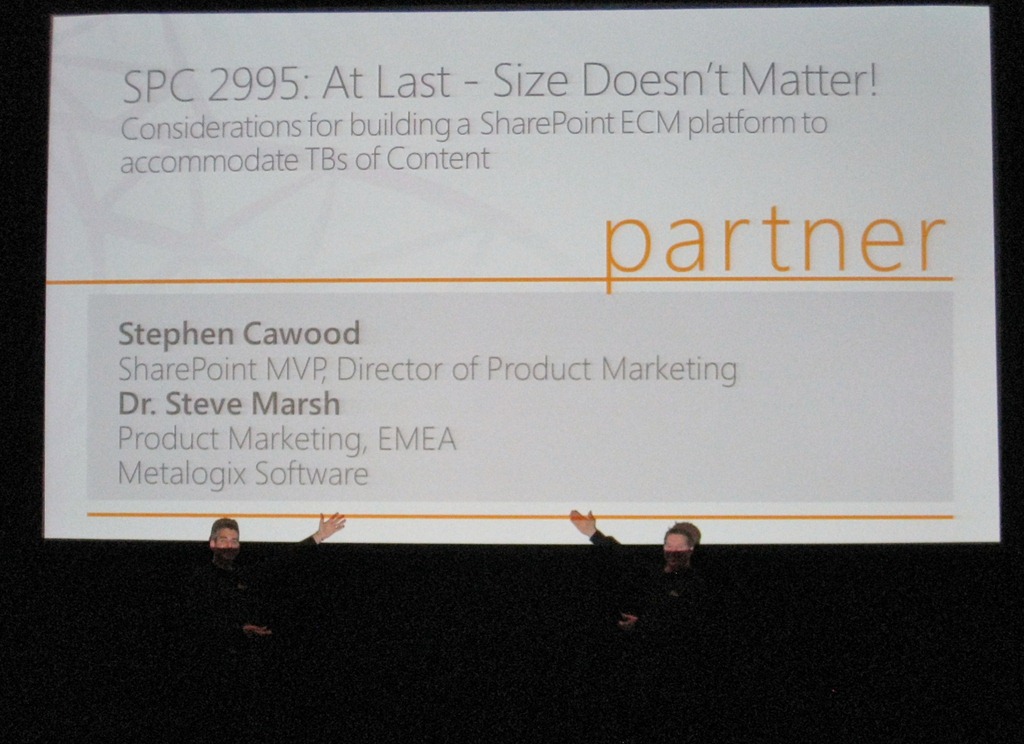
At this year’s show, I presented a session with Steve Marsh about considerations for creating SharePoint farms with terabytes of data. Our session was literally the last one in the guide. It was fun closing the conference, but I have to admit that I prefer to speak early and then have the rest of the event to meet with people; until I actually speak, I can’t help but tweak my presentation, so it’s always on my mind.

Stephen Cawood Metalogix SharePoint Conference 2011 SPC11

Stephen Cawood Marsh Microsoft SharePoint Conference 2011 SPC11 Metalogix Speakers
The rooms were darkly lit, so not a great speaker photo op

Metalogix also had great representation in other sessions. For example, the session about the Microsoft Search First Initiative, co-presented by our partners Microsoft and Arcovis.

Microsoft SharePoint Search First at SharePoint Conference SPC11 Arcovis

I’ll finish with one more shot of the venue. Doesn’t this image just yell, “SharePoint in the cloud?”

SharePoint in the cloud Office 365 SPC11

All in all, SPC11 was a great event and I’m really psyched about the Microsoft SharePoint Conference (#SPC12) in Las Vegas in 2012.

Tuesday, September 27, 2011

SharePoint Conference Attendance Is Down–Is that a problem?

There are many, many, SharePoint conferences around the world. But the biggest one remains the Microsoft SharePoint Conference (SPC). It happens about every 18 months or so and it’s the official event for all things SharePoint. This year’s conference is October 3-6 in Anaheim, CA and many of the attendees are thrilled that Microsoft has rented Disneyland for the attendee party.

SPC11_disney_ad

One interesting statistic about this year’s conference (#SPC11) is that registration is rumoured to be lower than the last show. The last SharePoint conference, SPC 2009, boasted an impressive 7,400 attendees at a time when the economy was still reeling from the crash. At that show, there was a buzz (and I was contributing to it) about how SharePoint was so healthy that there was no sign of the recession in the SharePoint space. By comparison, the 2007 conference had 3,800 attendees.

[Update: I’m told that registration has been solid right down to the wire and we should all stay tuned to see what the real number is when the show starts on Monday.]

[Update to the update: It has just been announced (the Friday before the show) that the conference has sold out. The actual attendee number hasn’t been announced yet.]

So, the rumoured lower attendance this year begs the question, “Is this a sign of a slow down in the SharePoint community?” and by extension, a problem that Microsoft needs to worry about? My position is that there is no issue and my rationale is threefold: the SharePoint business is healthy, this is the worst time in the SharePoint release cycle for a conference, and the SharePoint community is healthy.

The SharePoint business is healthy

SharePoint was the fastest Microsoft product in history to reach $1 Billion in revenue. That’s quite an accomplishment and it might be tempting for the SharePoint group to rest on their laurels. Well, that’s not the way Microsoft works. Product group employees typically change jobs every two years or so. That’s not to say that the whole team that shipped Microsoft Office SharePoint Server 2007 (MOSS) has moved on to other projects, but most of them are likely in different roles and that means this is their first release with their current responsibilities. That’s one of the techniques at Microsoft for keeping employees engaged.

In a recent survey conducted by Metalogix Software and ESG, “which surveyed 3,129 IT professionals, 64 percent of North American and Western European organizations are currently using SharePoint, while an additional 12 percent intend to within the next 24 months. This overwhelmingly confirms that SharePoint is now considered to be a top business application – 80 percent ranked it among their top 10 business applications- a significant update since the March 2009 survey.”

Of course, there’s another key factor in the outlook for SharePoint. In short, Office 365 changes the landscape of SharePoint market potential. Office 365 is Microsoft’s cloud offering that includes SharePoint 2010. For many companies out there, the attraction to the economics of the cloud will have them taking a long hard look at the silver lining of the Office 365 cloud (yes, that’s a mangled metaphor I know, sorry). Also, as I recently discussed in a couple of Metalogix hybrid cloud webinars, there are many scenarios that organizations are looking at which involve both SharePoint Online (e.g., Office 365) and SharePoint on-premises.

This is the worst time in the release cycle for a conference

We’re basically in the middle of the SharePoint release cycle. It’s a terrible time for a conference since the Beta of the next version is not out yet and the current release has been out for some time. This makes the conference a tougher sell for many people who have to justify the time and expense to their managers.

Stephen Cawood speaking at SPC11

The SharePoint community is healthy

If you have any doubts at all about the SharePoint community, just call up Dux Raymond Sy (@meetdux)—or any of the organizers for that matter—and ask how SharePoint Saturday the Conference went in DC this year. It was roughly twice the size of the same event last year and, at the time, that was the largest SharePoint Saturday event ever.

The SharePoint community is stronger than ever and it’s showing no signs of slowing. There are dozens of SharePoint experts around the world taking time out of their lives to travel to SharePoint conferences and deliver educational sessions. In fact, organizers of these events are receiving hundreds more session proposals than they can accommodate. The vibrant SharePoint community is envied by many and things are humming along just fine.

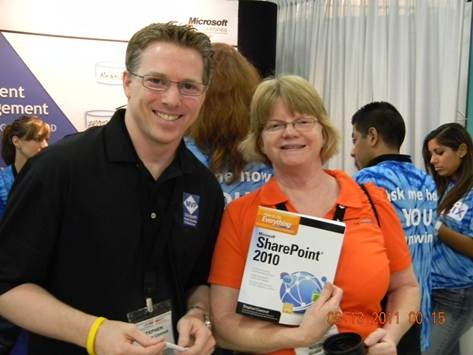
Stephen Cawood book signing How to do Everything SharePoint 2010 at SPSTCDC
- signing a book at SPSTC in DC

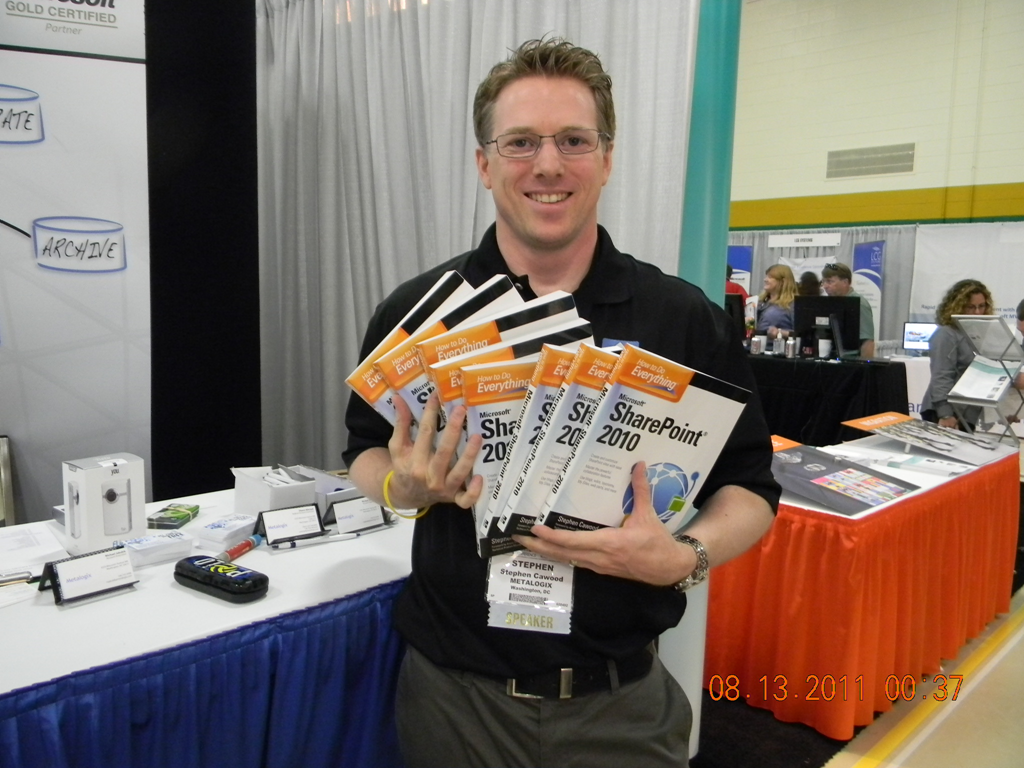
And now, my shameless plug: I’ll be doing a book signing at the Metalogix booth (we’re giving away copies of How to Do Everything: SharePoint 2010) and I’ll be co-presenting a session with Dr. Steve Marsh, on Thursday, October 6, at noon. The session is entitled, “At Last - Size Doesn’t Matter! Considerations for building a SharePoint ECM platform to accommodate TBs of Content” and will focus on three different customer scenarios that demonstrate how to free your SharePoint content.

Metalogix SharePoint billboard

- the Metalogix billboard on Interstate 105 in Anaheim

Friday, September 09, 2011

I’m speaking at the Microsoft SharePoint Conference 2011

I’ll be presenting a session at the Microsoft SharePoint Conference 2011 (#SPC11) in Anaheim, CA. I’ve had the honour of speaking at this show in the past—going back to the “Portal Airlift” in 2001. Last time, at SPC09, I presented a session on upgrading/migration to SharePoint 2010.

This year’s attendee party is at Disneyland, so I’m sure lots of people are excited about that.

Print

Of course, Metalogix will also have a strong presence at the big event as well. If you’re attending the show, look for the Metalogix booth in the exhibitor’s hall.

clip_image001

Saturday, August 27, 2011

What is SharePoint Governance to YOU? - Stephen Cawood

A couple of weeks ago at SharePoint Saturday The Conference in
DC, I recorded a short video for NothingButSharePoint.com’s video blog series What is SharePoint Governance to YOU?
I hadn’t announced GovernanceHx yet, so I didn’t talk about my own community project to provide SharePoint Governance administration in the cloud. But now that GovernanceHx has been announced, it’s clear why I chose the particular message for my contribution to What is SharePoint Governance to YOU? Check out the GovernanceHx post for more details.
Stephen Cawood NothingButSharePoint.com NBSP SharePoint Governance Office 365 reporting

Saturday, August 13, 2011

Announcing GovernanceHx – SharePoint Governance for Everyone!

I recently read an article that proclaimed--without any grey area--that Microsoft SharePoint governance has nothing to do with technology. I certainly understand the sentiment. Governing an enterprise platform such as SharePoint can be complicated and requires planning and buy-in from various people. However, I also believe that giving SharePoint users access to the right tools can empower them to keep track of whether their governance plans are being effectively enforced. To put it succinctly, wouldn’t you rather know right away about issues than wait until someone decides to proactively check for them?


In my vast spare time (for those who don’t know me, that’s a joke), I’ve been working on a SharePoint community application that I’m now ready to start talking about.

GovernanceHx is a web application that is bringing SharePoint governance to the Cloud. The application allows any SharePoint user to run free, read-only reports against their SharePoint servers with the express purpose of combatting SharePoint sprawl. This means that people without admin access, or development skills, can easily generate reports about the growth of their environment and use them to gain an insight into changes over time. This is why I chose to go with the name GovernanceHx. “Hx” is commonly used in the health care field as the abbreviation for history. GovernanceHx shows the governance health of your SharePoint server over time.

image
- A report results page from GovernanceHx

At this time, I’m showing some demos and recruiting a few SharePoint experts to be Governance Advisors on the project. I’m happy to announce that SharePoint expert and prolific conference speaker, Richard Harbridge, has joined the project as the first Governance Advisor.

Custom image

These advisors will help shape the future of the project by using their real-world SharePoint experience to identify the best application of the GovernanceHx framework. Since GovernanceHx tracks growth, the advisors will help figure out which growth reports will be most useful.
image 
And speaking of frameworks, that’s one of the coolest aspects of this project. I’ve developed the GovernanceHx reporting framework using Windows Azure, so users will not need to install anything at all on their SharePoint server to run reports against Office 365 or any SharePoint sites that are accessible over the net.

logo-office-365[1] 

Cloud-based SharePoint governance opens up all sorts of possibilities for Office 365/SharePoint online customers. For example, I’m sure there are plenty of small to medium businesses that would like a solution to help with their governance enforcement but simply can’t afford a large enterprise reporting application for the job. GovernanceHx will be the low friction way for these users to discover sprawl issues before they become unmanageable.

Speaking at SharePoint Saturday The Conference 2011

I had a great time this weekend presenting at SharePoint Saturday The Conference. It was the largest SharePoint Saturday event ever and it’s a great credit to the teams of organizers, volunteers, vendors and speakers that it went so well.

Sharepoint Saturday Conference

It is truly remarkable how the SharePoint community continues to produce these sorts of quality events. With 280 sessions, you can imagine how much effort went into the three days.

image

Where else can you see a talent show where a Metalogix employee (Corey) sings Mack the Knife while migrating a SharePoint 2007 site to SharePoint 2010?

At this year’s show, I co-presented two sessions about SharePoint migration and BLOB offloading with fellow Metalogix employee Corey Milliman and I also did two book signings for How to Do Everything: SharePoint 2010.

image

So now that #SPSTCDC is over, what will I do? I’m goin’ to Disneyland!

(For those who haven't heard, the attendee party is at Disneyland)

Thursday, August 04, 2011

Metalogix Loves SharePoint Saturday

This weekend I was in New York for SharePoint Saturday. I presented a session on migrating to Microsoft Office 365 (Metalogix was a Microsoft Office 365 sponsor). This was the third time I’ve attended the SharePoint Saturday New York event and I always enjoy going. This year was no exception, there were some great speakers and things ran smoothly.

In addition to sponsoring the event, we wanted to do something different. What we came up with was to post “Metalogix loves SharePoint” sign in Times Square. It was great to walk around Times Square and see the Metalogix logo between an infinite number of ads for the Smurfs. Metalogix is also giving away Flip cameras to people who tweeted photos of the billboard.

Stephen Cawood Metalogix loves SharePoint Times Square

You can read all about it on the Metalogix blog: Metalogix Loves SharePoint Saturday, NY

Metalogix was a proud Microsoft Office 365 sponsor at SharePoint Saturday New York this weekend. To show our pride, we arranged to have "Metalogix loves SharePoint" shown on one of the big billboards in Times Square.

We also held a contest to win Flip cameras. People who took a photo of the Metalogix billboard in Times Square tweeted their photos to the @metalogix Twitter account and are now entered to win a camera. We will be notifying the winners of the Flip cameras this week.

Metalogix loves SharePoint Times Square

Wednesday, August 03, 2011

Why I FINALLY became a OneNote User—and I’m not turning back

I’ve been meaning to write a post about how Microsoft Office OneNote has improved my productivity, but really, who has the time? OK, sorry no more of that. Today, Microsoft announced that the Office OneNote iPhone app will be free for a limited time. (It was published to the Canadian app store last week). Now I can use the same TODO list on my PC, online and on my phone--all nicely synchronized.

image
- the new OneNote iPhone app

I only recently became a devoted OneNote user. I know, I know… What took me so long? Well, I don’t have a great excuse. When I tried the first OneNote Beta build, it wasn’t able to create tables—obviously, it had far fewer features than the current release—but the inability to create tables was a deal breaker for me. Since then, I’ve seen a flood of people adopt OneNote and sing its praises. I often questioned if I was missing out, but I kept holding back. I’m a big Outlook fan and I just kept using Outlook for everything. E-mail, appointments, reminders… Why not keep notes in there as well? That’s what I did, but lately my inbox was getting the best of me and despite my best efforts, I could use some help. (I wrote about managing my Outlook inbox in my post, Don’t be an E-mail Hoarder–Improve Your Outlook Productivity.)

So what was I waiting for? It turns out that the killer feature for me was the ability to use Windows Live SkyDrive to synchronize my OneNote notebooks across multiples machines and the OneNote Web App. And, of course, as of today, my phone as well.

For me, the ability to share OneNote notebooks effortlessly across devices is a game changer. I can make notes at work, update them online and then when I grab my laptop, I can rest assured that it will update automatically when I go online. The cloud-based synchronization also means that my notebooks are automatically backed up for me—a hard drive crash isn’t going to mean any note data loss at all. The fact that SkyDrive, the OneNote web app, and the iPhone app are all free is a nice bonus.

If you’re still not sold on OneNote, take a look at the OneNote blog post about using OneNote notebooks to plan a vacation.

image
- Use the Office Web Apps version of OneNote to work with your notebooks online.

I’m happy that I finally took the time to investigate what OneNote can do and I don’t see myself giving up this excellent productivity tool. If nothing else, it will as least give my Outlook inbox a bit of a break.

image
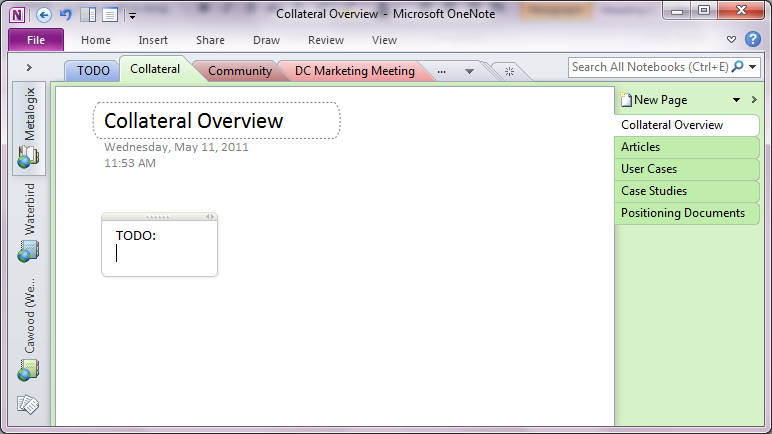
- The Office client version of OneNote